Edit PDF online free without uploading your file
PickPDF opens the document on your device and gives you separate tools for rewriting existing text, adding new text, and moving page objects.
 Open PickPDF
  Add to Chrome
Quick answer
Edit PDF online free without uploading your file
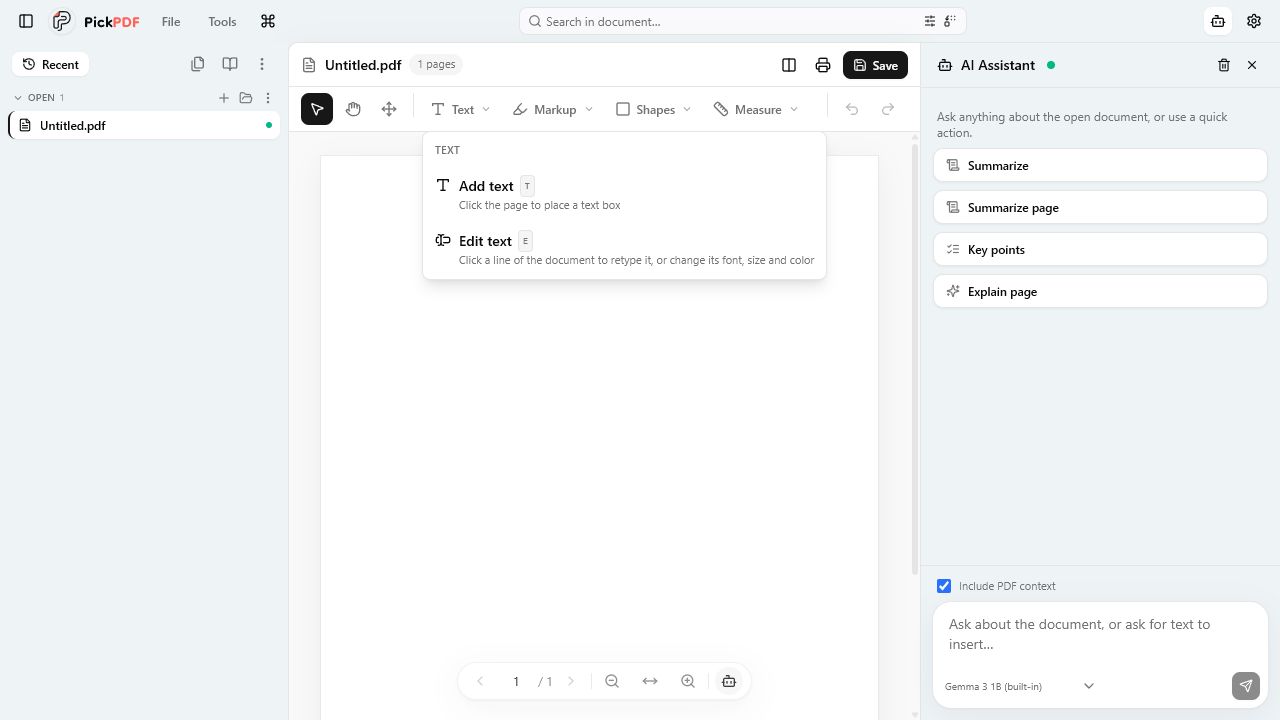
To edit PDF text in PickPDF, open the file, choose Text, then select Edit text. Click a line, paragraph, or text block and type the replacement. PickPDF uses PDFium to rewrite the original text object when its embedded font supports the new characters. Your document stays on your device during the edit.
Step by step
How to use this tool in PickPDF
Open the PDF
Open a file from the picker, drag it into PickPDF, or choose it from a folder. Password-protected files prompt you for the password before the editor loads the pages.
Choose the right text tool
Use Add text for a new text box. Use Edit text to rewrite text already stored in the PDF. Use Move objects when you need to move, resize, recolor, or delete an existing text run, image, or vector shape.
Edit one line or a larger block
Click the text and choose line, paragraph, or block scope. Keep the detected font and style, or adjust the font, size, and color from the contextual controls.
Save and reopen the result
Save in place when the browser or desktop app has a writable file handle. PickPDF downloads a new copy in other cases. Reopen the output and check the changed text before you send it.
Current capabilities
What the current PickPDF build supports
- Rewrites existing PDF text objects with PDFium
- Line, paragraph, and text-block editing scopes
- Add text, images, links, shapes, comments, and marks
- Move, resize, recolor, or delete existing page objects
- Undo and redo on the active document
- Local save-in-place or downloaded-copy workflow
How PickPDF edits existing text
A PDF stores text as positioned drawing instructions. Many browser editors avoid those instructions and place a new text box over the page. PickPDF takes a different route. Its Edit text tool asks PDFium for the original text object, preserves its position and styling, and writes the replacement into the page content stream.
The toolbar lets you edit one line, the paragraph around that line, or a contiguous text block. A smaller scope protects nearby layout. A larger scope helps when a sentence needs to reflow across line breaks. The live editor shows the change before PickPDF commits it to the document history.
Fonts decide which characters you can type
PDFs often embed a subset of a font instead of the full typeface. A subset may contain the letters used by the original document and nothing else. PickPDF reuses the embedded font when it can. If the replacement needs a missing glyph, the editor tells you instead of saving broken text.
Use Add text for that case. PickPDF includes standard PDF fonts plus metric-compatible Carlito and Caladea families for common Office documents. The added text becomes part of the saved PDF, but it remains a separate text box rather than a rewrite of the original run.
Editing scans, restricted files, and complex layouts
A scan contains page images, so the Edit text tool has no text object to select. Run Make searchable first. OCR adds an invisible text layer that supports search, copy, and later text work. Recognition errors can occur, so compare names, totals, and reference numbers with the scan.
Owner restrictions can disable editing, copying, or printing. PickPDF follows those permissions until you unlock the document with the permissions password. Dense layouts, unusual encodings, and converted design files may also need an overlay correction instead of a direct rewrite.
Where the file goes while you edit
PickPDF loads the PDF into local browser or desktop-app memory. The editor has no document-upload step. Save writes back to a writable source when the platform allows it; Download a copy creates a separate file.
The optional AI panel follows a separate rule. Its built-in model runs on the device after the model download. If you configure Ollama, LM Studio, or another endpoint, selected document text goes to that endpoint. The PDF editing tools themselves continue to run on the device.
Common questions
Questions about edit pdf online free without uploading your file
Can PickPDF change existing text instead of covering it?
Yes, when the PDF contains editable text objects and the embedded font supports the replacement characters. PickPDF rewrites the original object with PDFium. Add a text box when the source font or document structure blocks a direct edit.
Does editing a PDF change the original file?
PickPDF writes in place only when you choose Save and the browser or desktop app has a writable handle. You can use Download a copy to keep the source unchanged.
Can I edit text in a scanned PDF?
Run OCR first to add a searchable text layer. A scan still differs from a text-native PDF, so review recognized text and use an added text box when the page image needs a visible correction.