Redact a PDF online free without uploading it
Draw redaction boxes, apply them, and save a file where PickPDF has removed covered text and images from the page content.
 Open PickPDF
  Add to Chrome
Quick answer
Redact a PDF online free without uploading it
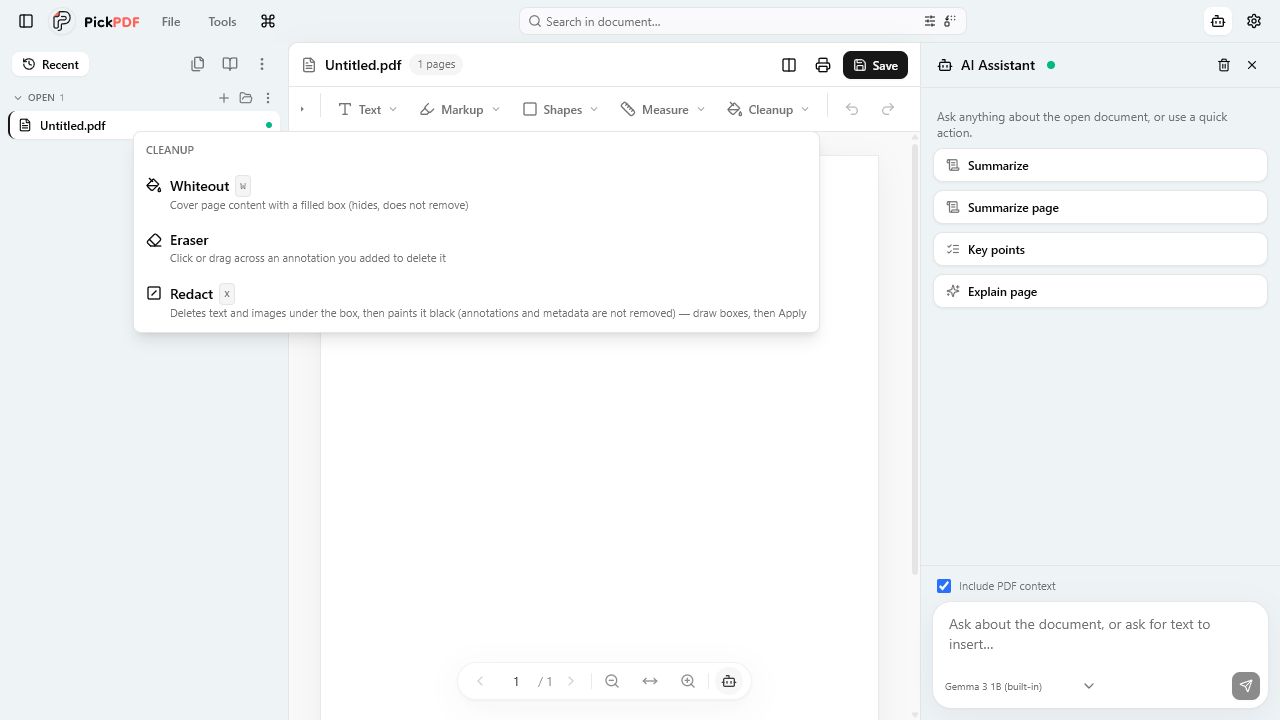
To redact a PDF in PickPDF, choose Cleanup, select Redact, and draw boxes over sensitive text or images. Click Apply redactions, then save a new copy. PickPDF removes covered page content with PDFium and paints the redaction area black. Search the saved file for the removed terms before sharing it.
Step by step
How to use this tool in PickPDF
Work from a copy
Keep the unredacted source in a protected location. Open a copy in PickPDF so you can correct a missed area without rebuilding the document.
Mark each sensitive area
Choose Cleanup, then Redact. Draw a box over every name, number, image, or passage that must leave the shared version. Zoom in around line edges and page margins.
Apply the redactions
Use Apply redactions after you review the marked pages. PickPDF deletes text and images under each box and paints the area black. Saving also enforces pending redaction boxes.
Verify the saved PDF
Reopen the output, search for each removed name or number, and try to select text around the black boxes. Review annotations and document metadata as a separate task.
Current capabilities
What the current PickPDF build supports
- Destructive text and image redaction through PDFium
- Black redaction boxes in the saved page
- Pending redactions enforced during save
- Local document processing
- Search and copy checks after saving
- Separate whiteout tool for non-confidential visual cleanup
Redaction removes content; whiteout covers it
A white rectangle can hide a word on screen while leaving the original text in the PDF. Someone may recover that word through search, copy and paste, accessibility tools, or inspection of the page content. Use Whiteout for layout cleanup, not for confidential information.
PickPDF sends applied redaction rectangles to PDFium. PDFium removes the covered text and image content, then PickPDF places the visible black box. This process addresses page content inside the rectangle. It does not claim to sanitize every other part of the file.
What a page redaction does not remove
A redaction box targets the visible page region. PDF metadata may still contain a title, author name, subject, or keywords. Comments, file attachments, form values, hidden layers, and earlier document versions also need separate review when the file carries legal, financial, medical, or personnel information.
PickPDF exposes document properties and panels for several of these elements, but you should treat sanitization as its own checklist. The redaction tool states its boundary in the interface: it removes text and images under the boxes, not annotations or metadata.
How to check a redacted PDF before sharing
Save to a new filename, close the editor, and reopen that saved file. Search for each redacted term and common variants. Drag across the surrounding lines and paste the copied result into a plain-text editor. Inspect thumbnails because a small missed box can sit outside the current viewport.
Check document properties, comments, attachments, form fields, and layers when those features appear in the source. A formal disclosure process may require a dedicated sanitization tool or a second-person review. PickPDF gives you local redaction controls; your review process decides whether the output meets the rules for the document.
Why local redaction reduces exposure
Redaction often involves the exact material you cannot disclose: account numbers, addresses, health details, signatures, and internal notes. PickPDF opens and processes the file on the device, so marking and applying redactions does not require a document upload.
Local processing reduces one transfer in the workflow. It does not replace access controls for the source file, backups, email, or the final shared copy. Store both versions according to the policy that applies to your work.
Common questions
Questions about redact a pdf online free without uploading it
Is drawing a black box enough to redact a PDF?
No. A visual box can leave the original text underneath. Apply a destructive redaction, save the result, reopen it, and search for the removed terms.
Does PickPDF remove metadata during redaction?
The redaction tool removes covered page text and images. It does not remove annotations or document metadata. Review those elements before sharing sensitive files.
Can I undo a redaction after I save?
Applied redaction removes page content from the saved output. Keep an unredacted source under appropriate controls if you may need to revise the disclosure.